Ways to write control code
Control code decides what a machine does: it reads sensors, makes decisions, and moves hardware. You can write it in the Viam web app’s code sandbox, in a script on your laptop, in an inline module, or in a module you publish to the registry.
The options differ in where the code runs. That decides whether it keeps running after you close your laptop, whether Viam saves it, and who else can use it. This page explains each option and when to use it, so you can start in the right place and know when to move on.
Check for an existing module first
You may not need to write code.
viam-server includes built-in models for common hardware and services, and the registry has modules from Viam and the community for many more.
A module that already does what you need saves you writing, building, and maintaining your own.
Search the registry before you start, and write your own code for the part that’s specific to your machine. See Add software capabilities from the registry.
Where control code runs
Control code runs in one of two places: off the machine, as a client, or on the machine, as a module.
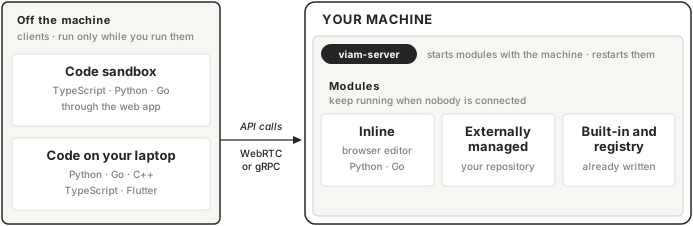
A client connects to the machine over the network and calls its API, the same way the CONTROL tab does. It runs only while you run it, and it stops when you close the browser tab or your laptop sleeps. That makes clients fast to start and change, which is what you want while you’re working out what the code should do.
A module runs on the machine as a child process of viam-server.
viam-server starts it when the machine starts, restarts it if it crashes, and passes it the components it depends on.
Module code keeps working when nobody is connected, which is what you want once the code needs to run unattended.
The code sandbox
The code sandbox is an editor on your machine’s CONTROL tab in the Viam web app. It opens with a starter program for your machine’s configured resources, and you run it against the live machine without an API key or address. You can write it in TypeScript, Python, or Go.
Use it to try an SDK method, check how a component responds, or prototype a short sequence of commands without installing anything.
The sandbox isn’t for code you want to keep:
- Nothing is saved. Leaving the page or switching parts discards your code. Download it as a file to keep it.
- Runs are short. A Python or Go program stops after 5 minutes. The Python and Go sandbox disconnects after 5 minutes of inactivity, and after 3 hours in any case.
To get started, see Code sandbox.
Code on your laptop
A script on your laptop uses one of the Viam SDKs: Python, Go, TypeScript, C++, or Flutter. The machine’s CONNECT tab has a starter sample for each SDK, with the machine’s address filled in. Turn on Include API key to add an API key to the sample. The script connects over the internet or your local network.
Use it when you want your own editor, debugger, and version control while you develop.
Use modules for production
Coding from your laptop is useful for prototyping and rapid development, but for production applications we strongly recommend running code directly on your robots using modules, as described below.
The script runs only while your laptop runs it. To keep the logic running on the machine, move it into an inline module or an externally managed module. The same SDKs build web and mobile apps for your users; see Build apps.
To get started, see App scaffolding and Connect to a machine.
Inline modules
You write an inline module in Python or Go, in an editor in the Viam web app.
When you click Save & Deploy, Viam stores your source, builds it in the cloud, and deploys it to your machine.
Each save is a new version (0.0.1, 0.0.2, and so on) and starts a cloud build that typically takes a few minutes, and you can keep editing while it runs.
There’s nothing else to set up: no repository, no build tooling, no release process.
Use an inline module when your code needs to run on the machine without your laptop, and you don’t need to share it outside your organization. Inline modules are private to your organization. You can add one to several machines, or to a fragment that configures many machines at once.
An inline module implements the generic service API, which has a single method, DoCommand.
That covers control logic, but not a driver for new hardware, which needs a component API.
You also can’t use your own repository or choose version numbers.
To get started, see Write an inline module.
Externally managed modules
You write an externally managed module in your own editor, keep it in your own repository, and upload it to the Viam registry. You choose its versions, and machines can track the latest version or pin one. You upload builds from the CLI, or let Viam build from your repository or a local directory.
Use an externally managed module when:
- you need a component API, for example a driver for hardware Viam doesn’t support
- you want your own source control, code review, and release process
- you want to share the module beyond your organization
An externally managed module can be private to your organization, public, or unlisted, which means anyone with its ID can use it but it doesn’t appear in registry search.
To get started, see Write a logic module, Write a driver module, and Deploy a module.
How to choose
| Option | Runs | Keeps running without you | Saved by Viam | How you share it |
|---|---|---|---|---|
| Code sandbox | Through the web app | No | No; download the file | Copy or download the code |
| Code on your laptop | On your computer | No | No; use your own repository | Your own repository |
| Inline module | On the machine | Yes | Yes | Add it to machines in your organization |
| Externally managed module | On the machine | Yes | Builds only; source in your repository | Through the registry, privately or publicly |
Start with the sandbox or a laptop script while you work out what the code should do. Move to a module when it needs to run unattended. Choose an inline module when the generic service API and your organization are enough, and an externally managed module when they aren’t.
Moving from prototype to production
Viam doesn’t convert client code into a module for you.
The SDK calls stay the same, but in a module they run inside a resource that declares the components it uses as dependencies, and viam-server passes those in instead of your code connecting to the machine.
See Module dependencies and Build and deploy modules.
What’s next
- How to use Viam: the other ways to work with Viam, alongside writing code.
- Code sandbox: try your first SDK call against a live machine.
- Write an inline module: run control logic on your machine without setting up a repository.
- Build and deploy modules: how modules work, and the difference between inline and externally managed modules.
Was this page helpful?
Glad to hear it! If you have any other feedback please let us know:
We're sorry about that. To help us improve, please tell us what we can do better:
Thank you!