Phase 7: Build the test datasets
At the end of this phase, you have two labeled test datasets that neither model has seen: dice-test-clean, taken the same way as your training images, and dice-test-hard, taken in conditions the models never trained on.
A model can score well on the images it learned from and still fail on new ones, so you score models only on images they didn’t train on.
The labels in these datasets are the answer key, so they need to be right.
Capture and label the clean test dataset
- Create a dataset named
dice-test-clean. - Add about 20 images to it from the Test section of the
cameracard on the CONFIGURE tab, with the same dice, camera height and light as your training images. - Add three images of the empty background, with no dice.
- Open
dice-test-clean, click Run model, then Get auto-predictions, and get predictions fromdice-starter-modelat a confidence threshold of0.25, as in Phase 4. As in Phase 4, this is billed as compute time for each image. - Review every prediction, and draw a box on every die that has none.
Check every box here, not just the ones that look wrong. These labels are the answer key for Phase 8, so a wrong label makes a model that reads the die correctly look wrong.
Checkpoint
dice-test-clean shows about 23 images, every die in the 20 dice images has a correct box, and the three empty images have none.
If you find a box with the wrong value, delete it and draw a new one.Capture and label the hard test dataset
This dataset shows how each model copes with conditions it didn’t train on, which is where models usually differ most.
Create a dataset named
dice-test-hard.Add about 20 images, mixing these conditions:
- The camera raised to about 45 cm, so the dice look smaller.
- Three to five dice pushed together so they touch.
- A different background, such as a sheet of colored or patterned paper under the dice.
- Dimmer light, such as one lamp turned off.
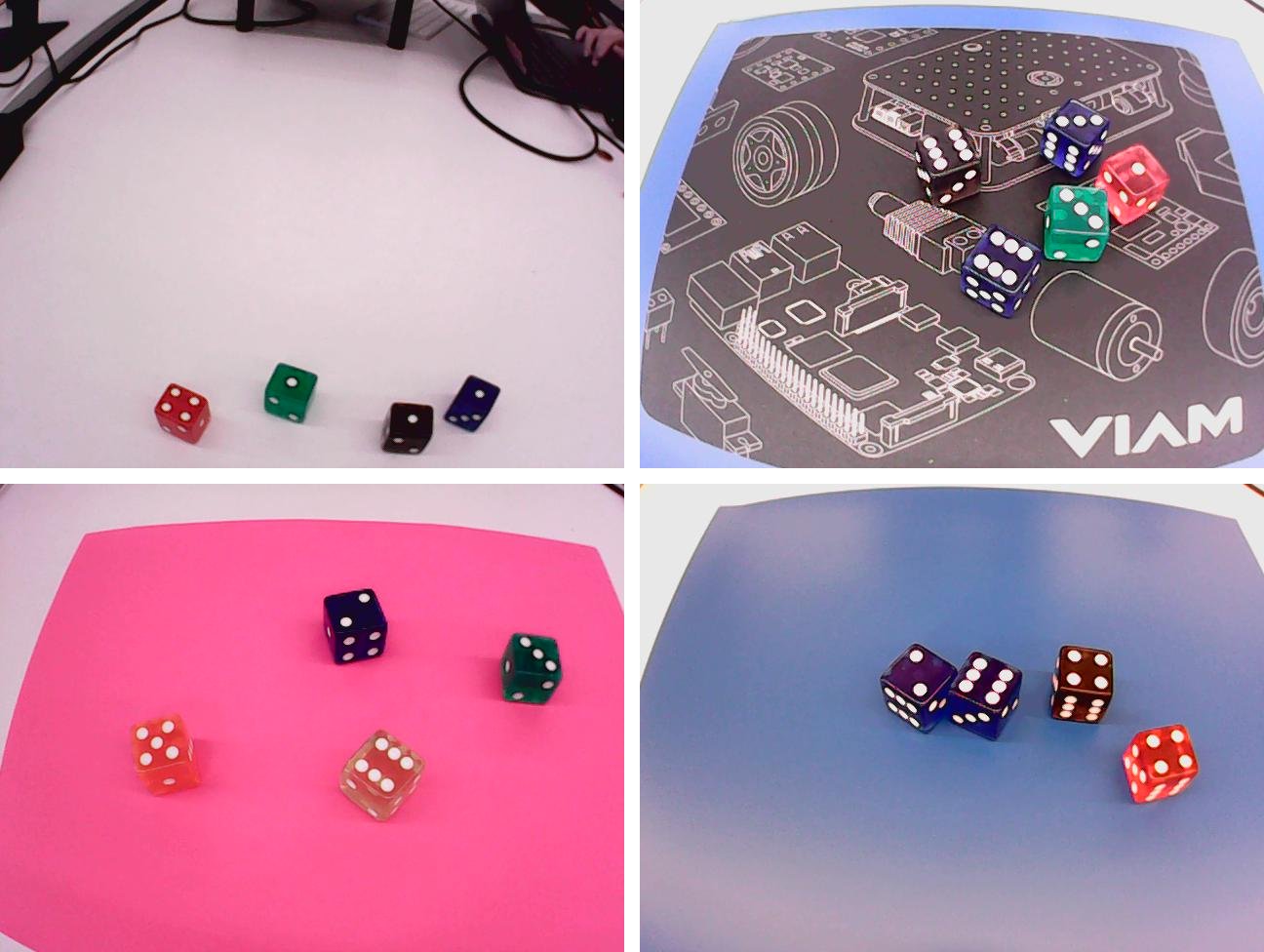
Add three images of the empty background.
Label every die, either by hand as in Phase 2, or with auto-predictions from
dice-starter-modelas in Phase 4. The starter model never trained on these conditions, so expect to fix more of its boxes, and check every one.Put the camera back at its original height and angle. In Phases 9 and 10 the model reads live rolls, and it reads them best from the position it was trained on.

Checkpoint
dice-test-hard shows about 23 images, every die in the 20 dice images has a correct box, and the three empty images have none.
If you can’t tell a die’s value yourself, remove that image from the dataset rather than leaving the die unboxed; an unboxed die counts against any model that finds it.The empty images let the evaluation count false positives: boxes a model draws where there’s no die.
In the next phase, you score both models on both test datasets and pick the one Yahtzee will use.
Was this page helpful?
Glad to hear it! If you have any other feedback please let us know:
We're sorry about that. To help us improve, please tell us what we can do better:
Thank you!