What is Viam?
Viam is a software platform for building, deploying, and managing robotics applications.
You tell Viam what hardware and software capabilities your machine needs, and Viam handles the drivers, networking, and infrastructure so you can focus on what your machine actually does.
It is the development workflow you already know, applied to physical devices: version control, remote monitoring and diagnostics, staged rollouts, and a registry of modules and models you can build on.
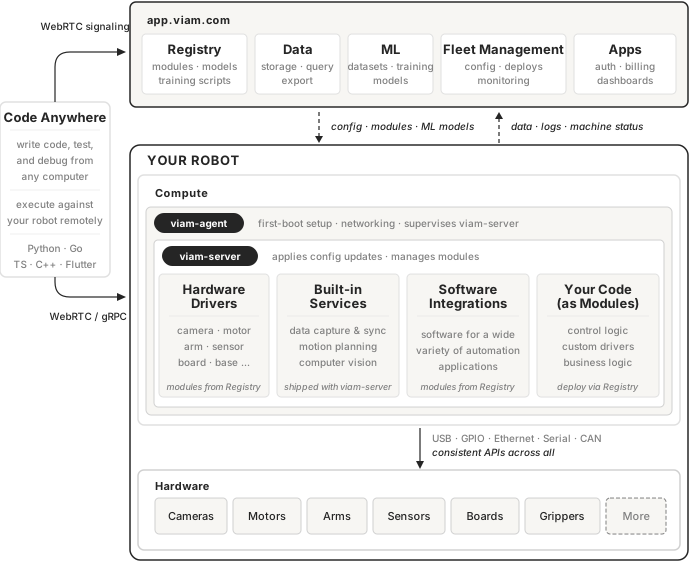
Platform mental model
This section covers the building blocks you’ll see throughout Viam: what a machine is, how you describe its hardware, and where the software that controls it comes from.
Machines and parts
On the Viam platform, a machine is the combination of your compute resources and hardware that you want to control using Viam. A machine might be a robot arm with a gripper and a camera, a Raspberry Pi wired to some sensors, or a laptop collecting data through a webcam.
Every machine has at least one part: the computer that runs Viam’s software and is connected to one or more physical devices.
A part can be almost any computer, including your own Mac or PC. Installing Viam on a part sets up two programs:
viam-agentinstallsviam-server, supervises it, and keeps it up to date.viam-serveris the core runtime. It pulls your machine’s configuration from Viam’s cloud, downloads the software that configuration needs, and keeps everything running.
Configuration, resources, and models
Every part has a JSON configuration describing what hardware is connected to the part and what that hardware can do. You edit it on app.viam.com or the CLI, and the machine picks up your changes automatically.
Everything in the configuration is a resource. Resources come in two kinds:
- Components represent physical hardware: a camera, a motor, a sensor, an arm, a gripper, or a board. Each one wraps a piece of hardware and exposes a standard API for it (for example, an arm API with move commands or a camera API that returns images).
- Services are software capabilities running on the machine, such as computer vision, motion planning, data management, and any other code that controls the machine.
Every resource has an API, and a model is a specific implementation of that API.
For example, an SO-101 arm and a uFactory xArm6 arm are both models of the arm component API: they expose the same methods (MoveToPosition, GetEndPosition, and so on) even though the underlying hardware and protocols differ.
The same applies to services: the ML model service API has models for TFLite, ONNX, and other inference runtimes, each implementing the same Infer method.
When you configure a resource, you choose both the API (what kind of resource it is) and the model (which implementation to use).
Built-in resources and modules
Some resources are built-in, meaning viam-server ships with them by default. These include services like motion planning and computer vision, as well as basic hardware drivers like arms and cameras.
See built-in components and services for the full list.
Beyond builtins, the Viam registry has modules for thousands of hardware drivers and software capabilities, maintained by Viam and the community. Before building something yourself, check the registry and the built-in services to see if your use case already exists.
If nothing in the registry fits, you can write and publish your own module.
What you can do with Viam
| To do this | Go here |
|---|---|
| Get a camera, motor, arm, or sensor running | Configure hardware |
| Capture data on the machine and sync it to the cloud | Manage data |
| Train machine learning models on what you captured | Train ML models |
| Detect and classify objects in a camera feed | Computer vision |
| Plan and execute motion for arms and mobile robots | Motion planning |
| Write code that controls a machine over the network | Viam SDKs |
| Control a machine from an AI agent or LLM | Use Viam from an AI agent |
| Package your own logic and deploy it to machines | Build and deploy modules |
| Build a web or mobile app for your customers | Build apps |
| Monitor machine status and receive alerts, stream data, and teleoperate | Monitor and operate |
| Configure and update many machines at once | Fleet deployment |
| Configure and reuse a configuration across machines | Reuse configuration with fragments |
| Organize machines and control who can reach them | Admin and access |
Next steps
- Try Viam to work through a complete project without buying any hardware.
- Set up your first machine when you have a device ready to connect.
Was this page helpful?
Glad to hear it! If you have any other feedback please let us know:
We're sorry about that. To help us improve, please tell us what we can do better:
Thank you!